🎧 Prefer to listen?
Your browser does not support the audio element.
I made a TikTok dance video for $0.39 with AI — here’s the exact prompt#
Last night I spent $0.39 and made a TikTok dance video. No dancer. No camera. No studio. Two AI tools. One prompt. Ten seconds of content.
Here’s exactly how I did it — and the full prompt you can steal.
The pipeline#
Two tools. Two API calls. That’s it.
GPT Image 2.0 ($0.09) — generates the 9-panel storyboardPixVerse v6 ($0.295) — turns the storyboard into video
Total: $0.39 for a 10-second dance video that looks like it cost $500 to produce.
Step 1: Generate the storyboard#
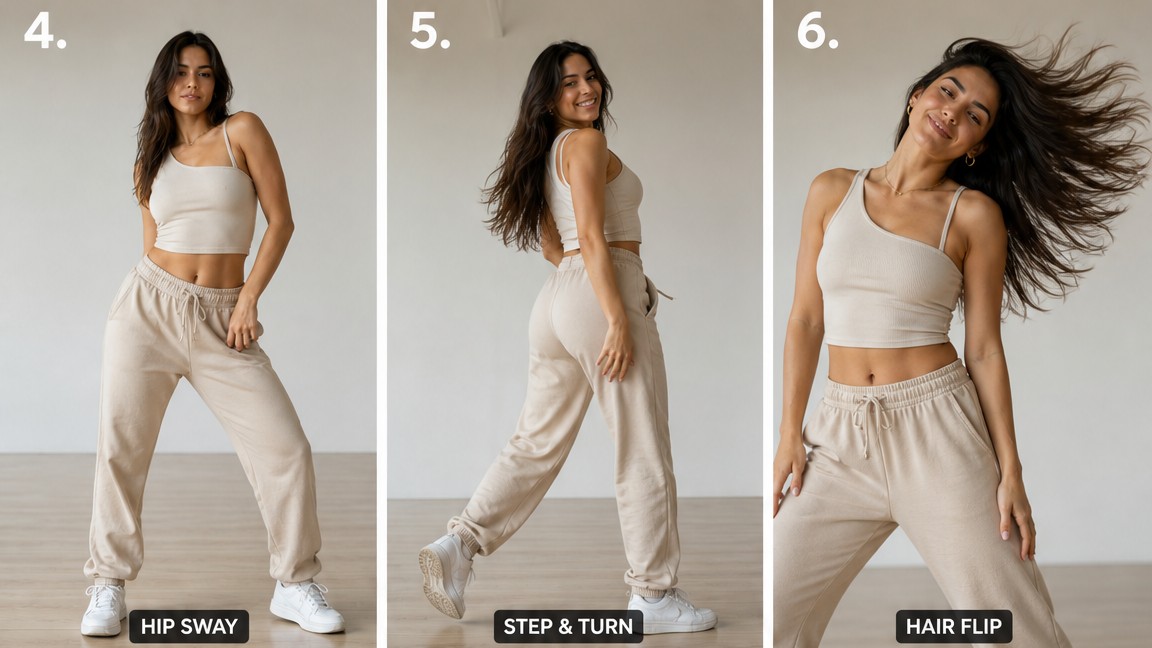
I used GPT Image 2.0 with a 9:16 aspect ratio and a detailed prompt that specified every panel in a 3x3 grid. Each panel is a different shot type — wide, medium, close-up — showing a different dance move.
Here’s the exact prompt I used:
 1
 2
 3
 4
 5
 6
 7
 8
 9
10
11
12
13
14
15
16
Generate a clean TikTok dance storyboard in a 9:16 portrait layout
with 9 panels arranged in a 3x3 grid. A fit confident woman with
minimal stylish outfit. Soft natural lighting, plain dance studio
background, neutral tones. Each panel shows a different dance moment:

top-left: wide neutral pose
top-center: arm wave
top-right: close-up expression
mid-left: hip sway
mid-center: step and turn
mid-right: hair flip
bottom-left: full dance combo
bottom-center: signature pose
bottom-right: direct eye contact smile

Clean minimal smartphone-style TikTok aesthetic.
The output is a single image with all 9 panels. That image becomes your input for the video model.
Step 2: Animate with PixVerse v6#
Take the storyboard image URL and feed it into PixVerse v6 image-to-video. The prompt I used:
1
2
3
A fit woman performing a TikTok dance sequence, smooth flowing
dance movements, energetic hip hop style dance, dynamic camera,
warm studio lighting, smartphone vertical video feel
Set aspect ratio to 9:16 and duration to 10 seconds. That’s it.
The reusable JSON (steal this)#
I saved the full storyboard as a JSON template. You can modify the panels, change the style, and regenerate different versions:
 1
 2
 3
 4
 5
 6
 7
 8
 9
10
11
12
13
14
15
16
17
18
19
20
{
"name" : "TikTok Dance Storyboard v1" ,
"image_model" : "gpt-image-2-text-to-image" ,
"video_model" : "pixverse-v6-i2v" ,
"cost" : {"image" : 0.09 , "video" : 0.295 , "total" : 0.385 },
"aspect_ratio" : "9:16" ,
"duration" : 10 ,
"panels" : [
{"pos" : "top-left" , "shot" : "Wide" , "action" : "Neutral pose" },
{"pos" : "top-center" , "shot" : "Medium" , "action" : "Arm wave" },
{"pos" : "top-right" , "shot" : "Close-up" , "action" : "Expression" },
{"pos" : "mid-left" , "shot" : "Medium-wide" , "action" : "Hip sway" },
{"pos" : "mid-center" , "shot" : "Tracking" , "action" : "Step and turn" },
{"pos" : "mid-right" , "shot" : "Close-up" , "action" : "Hair flip" },
{"pos" : "bottom-left" , "shot" : "Wide" , "action" : "Full combo" },
{"pos" : "bottom-center" , "shot" : "Medium" , "action" : "Signature pose" },
{"pos" : "bottom-right" , "shot" : "Close-up" , "action" : "Eye contact" }
],
"style_variants" : ["minimal" , "street" , "fitness" , "elegant" , "retro" ]
}
Style variants you can try#
Change the prompt text to match these themes:
Style
Background
Outfit
Vibe
Minimal (default)Dance studio, neutral
Simple top + shorts
Clean, TikTok native
Street Urban backdrop, neon
Streetwear, hoodie
Edgy, urban
Fitness Gym, equipment visible
Athletic wear
Energetic, strong
Elegant Ballroom, curtains
Flowing dress
Cinematic, premium
Retro 70s disco, colorful
Vintage outfit
Fun, nostalgic
Just swap the prompt text and regenerate. Same grid, different look.
The math#
If you post one dance video a day:
Daily cost: $0.39Monthly cost: $11.70Videos per month: 30
Compare that to:
Hiring a dancer: $200-500 per video
Filming yourself: Hours of setup, lighting, editing
Stock footage: Generic, not yours
$0.39 per video vs $200+. That’s a 500x cost reduction.
What you need (the full setup)#
Tools:
muapi.ai — API key that gives you access to 100+ models (GPT Image 2.0, PixVerse v6, Seedance, Kling, etc.) through one endpoint. Get your key here → That’s it. No other subscriptions.
Cost breakdown:
API key: free to create, pay per generation
Each dance video: $0.09 (image) + $0.295 (video) = $0.39
The exact code (copy and run)#
Step 1: Generate the storyboard image#
1
2
3
4
5
6
7
8
curl -X POST "https://api.muapi.ai/api/v1/gpt-image-2-text-to-image" \
"x-api-key: YOUR_API_KEY" \
"Content-Type: application/json" \
'{
"prompt": "Generate a clean TikTok dance storyboard in a 9:16 portrait layout with 9 panels arranged in a 3x3 grid. A fit confident woman with minimal stylish outfit. Soft natural lighting, plain dance studio background, neutral tones. Each panel shows a different dance moment: top-left wide neutral pose, top-center arm wave, top-right close-up expression, mid-left hip sway, mid-center step and turn, mid-right hair flip, bottom-left full dance combo, bottom-center signature pose, bottom-right direct eye contact smile. Clean minimal smartphone-style TikTok aesthetic.",
"aspect_ratio": "9:16",
"num_images": 1
}'
This returns a request_id. Poll for the result:
1
2
curl -H "x-api-key: YOUR_API_KEY" \
  "https://api.muapi.ai/api/v1/predictions/REQUEST_ID/result"
Wait for status: "completed", then grab the image URL from outputs[0].
Step 2: Animate the storyboard#
1
2
3
4
5
6
7
8
9
curl -X POST "https://api.muapi.ai/api/v1/pixverse-v6-i2v" \
"x-api-key: YOUR_API_KEY" \
"Content-Type: application/json" \
'{
"images_list": ["YOUR_IMAGE_URL_FROM_STEP_1"],
"prompt": "A fit woman performing a TikTok dance sequence, smooth flowing dance movements, energetic hip hop style dance, dynamic camera, warm studio lighting, smartphone vertical video feel",
"aspect_ratio": "9:16",
"duration": 10
}'
Same polling pattern. When it completes, download your video from outputs[0].
Python version (if you prefer)#
 1
 2
 3
 4
 5
 6
 7
 8
 9
10
11
12
13
14
15
16
17
18
19
20
21
22
23
24
25
26
27
28
29
30
31
32
33
34
35
36
37
38
39
40
41
42
43
44
import requests, time, json
API_KEY = "YOUR_API_KEY"
BASE = "https://api.muapi.ai/api/v1"
## Step 1: Generate storyboard
r1 = requests. post(f " { BASE} /gpt-image-2-text-to-image" ,
headers= {"x-api-key" : API_KEY, "Content-Type" : "application/json" },
json= {
"prompt" : "Generate a clean TikTok dance storyboard in a 9:16 portrait layout..." ,
"aspect_ratio" : "9:16" ,
"num_images" : 1
})
request_id = r1. json()["request_id" ]
## Poll for image
while True :
time. sleep(8 )
result = requests. get(f " { BASE} /predictions/ { request_id} /result" ,
headers= {"x-api-key" : API_KEY}). json()
if result["status" ] == "completed" :
image_url = result["outputs" ][0 ]
break
## Step 2: Animate
r2 = requests. post(f " { BASE} /pixverse-v6-i2v" ,
headers= {"x-api-key" : API_KEY, "Content-Type" : "application/json" },
json= {
"images_list" : [image_url],
"prompt" : "A fit woman performing a TikTok dance sequence..." ,
"aspect_ratio" : "9:16" ,
"duration" : 10
})
video_id = r2. json()["request_id" ]
## Poll for video
while True :
time. sleep(8 )
result = requests. get(f " { BASE} /predictions/ { video_id} /result" ,
headers= {"x-api-key" : API_KEY}). json()
if result["status" ] == "completed" :
video_url = result["outputs" ][0 ]
print(f "Done! Video: { video_url} " )
break
Alternative video models (pick your favorite)#
PixVerse v6 is my go-to, but muapi.ai has other options:
Model
Cost
Quality
Best for
PixVerse v6 $0.295/10s
High
Dance, movement, energy
Seedance Pro $0.18/5s
High
Smooth transitions
Kling v3.0 Standard $0.72/5s
Very high
Cinematic quality
LTX-2.3 $0.104/5s
Good
Budget-friendly
Wan 2.7 $0.10/5s
Good
Budget-friendly
Same workflow, just swap the endpoint name. The image generation stays the same.
What’s coming next#
I’m building more storyboard templates:
Fitness reel — gym movements, athletic wearProduct showcase — 9-panel product storyTutorial breakdown — step-by-step visual guideBefore/after — transformation storyboards
Subscribe to the newsletter to get them when they drop.
This is the kind of thing I build and share on @manalbuilds . Real tools. Real output. No courses.
FTC Disclosure: This post is not sponsored. I’m not affiliated with muapi.ai. I just use their API.
References#
muapi.ai — API access to 100+ modelsmuapi.ai/docs — Full API documentationGPT Image 2.0 — OpenAI’s latest image generation model
PixVerse v6 — Video generation from images